Skip to content
WordPress News Automation Plugin

Your Newsroom on Autopilot.

Import news from RSS Nepal and other websites. Automatically classify stories, detect duplicates, identify provinces, manage images and publish in Nepali or English — with editorial control built in.

View pricing & buy a licence
  • WordPress 5.9+
  • PHP 7.4+
  • Nepali & English

Automate the repetitive parts

Automate the repetitive parts of your newsroom without giving up editorial control.

Reduce manual importing

Stories from RSS Nepal and other websites arrive as WordPress posts on a schedule.

Manage multiple sources

Configure each source separately — volume, age, category, logo, images and rewrite mode.

Improve category consistency

Weighted keyword scoring with AI help for uncertain stories.

Reduce duplicate stories

The same news from different sources is caught even when headlines differ.

Automate image management

Unsuitable images are rejected and safe replacements suggested for review.

Retain editorial approval

Hold uncertain, duplicate or hard-news stories for an editor before they go live.

Video walkthrough

Watch the Plugin in action

A guided tour of a live newsroom: the control center, importing, web sources, categories, provinces, images and AI.

Workflow

What happens to every story

Each step can be configured, and stories that need a human are routed to the review queue.

  1. 1

    Connect RSS Nepal or add a website

    Use your own RSS Nepal subscription, or add homepages, section pages and feeds.

  2. 2

    Fetch articles automatically

    Every N minutes (15 by default) via WP-Cron, background execution or server cron.

  3. 3

    Extract and clean article content

    Headline, date, author, section, full story and main image — without ads, share buttons, related links or comments.

  4. 4

    Detect duplicates

    Exact copies and same-news stories are skipped; possible duplicates go to review.

  5. 5

    Classify category and province

    Hybrid keyword + AI classification and automatic province tagging.

  6. 6

    Check image quality and safety

    Reject logos and placeholders; never generate AI images for crime, accident or death stories.

  7. 7

    Copy or rewrite content

    Keep the original, or rewrite in Nepali or English with a second-pass fact check.

  8. 8

    Publish automatically or send to editor review

    Confident stories publish; uncertain ones wait for an editor.

Complete feature list

Everything the Plugin does

A sophisticated newsroom automation system — not just an RSS importer.

01

Automatic News Import from Two Sources

Bring in full articles from your RSS Nepal subscription and from any news website, homepage, section page or feed.

RSS Nepal integration

  • Connect using your own RSS Nepal subscription
  • Import full articles automatically
  • Choose lists: Nepali, English, International Nepali, International English

Import from other websites

  • Add a website homepage
  • Add a section page such as /news or /sports
  • Add a website's RSS or Atom feed

Content extraction

  • Headline
  • Publication date
  • Author
  • Section
  • Full story
  • Main image

Removes unwanted content

  • Advertisements
  • Social share buttons
  • Related news sections
  • Comments

Request handling

  • Retries difficult-to-access websites with different browser identities, including Chrome, Firefox and mobile Safari

Per-source configuration

  • Articles per source
  • Maximum story age in hours
  • Stories per run
  • WordPress category
  • Source logo
  • Image handling
  • Rewrite mode
02

Automatic Scheduling

Fetch news every N minutes (15 by default), using WP-Cron, background execution or a real server cron job.

  • Fetch news every N minutes — default interval 15 minutes, fully configurable
  • Choose which sources each run reads: both sources, RSS Nepal only, or websites only

WP-Cron

  • WordPress's built-in scheduler. It only runs when someone visits the site, so on quiet sites or hosts that block it, runs can be late or skipped.

Background execution

  • The Plugin can run the import after the visitor-facing page has already been sent, so readers never wait — useful where WP-Cron is blocked or unreliable.

Real server cron

  • A cron job on your server calls the import on a fixed schedule, independent of traffic. This is the most reliable option and is fully supported.

Scheduled jobs depend on correct server configuration. Some hosts restrict cron or background requests; we help you choose the right setup during onboarding.

03

AI Category Sorting — Hybrid Classifier

Fast keyword scoring handles clear stories; AI steps in only when keywords are uncertain, with voting, verification and a human review queue.

Keyword classification

  • Headline matches carry more weight than lead matches
  • Lead matches carry more weight than body matches
  • Negative keywords reduce category scores
  • Nepali category keywords supported

AI classification

  • Used only when keyword classification is uncertain
  • Multiple Gemini models can perform different tasks and vote
  • Ambiguous results receive additional verification
  • A verifier double-checks the classification
  • Optional web-search backup through SerpApi or Serper.dev to investigate unclear stories

Three outcomes

  • Published automatically
  • Verified before publishing
  • Held for editor review

Guardrails and learning

  • Adjustable confidence threshold
  • Only existing WordPress categories can be selected — AI cannot invent or modify categories
  • International stories not about Nepal can be routed to the International category
  • Manual editor corrections are recorded
  • Keyword suggestions are generated from corrections and require human approval before they apply
04

Automatic Province Tagging

Identifies which of the seven provinces a story is about from districts, towns and datelines.

  • Supports all seven provinces
  • Uses districts, towns and datelines
  • Understands common Nepali grammatical endings, such as झापाको and पोखरामा
  • Handles common spelling variations
  • Avoids false matches, such as confusing बारा with बाराही
  • Does not assign Bagmati to every national story simply because it was filed from Kathmandu
05

Hard News / Soft News Filtering

Classify web stories as hard or soft news and choose what to import — with optional editor approval for hard news.

Classification

  • Hard news: politics, economy, crime, disasters and similar topics
  • Soft news: entertainment, sports, lifestyle and similar topics

Import options

  • Hard news only
  • Soft news only
  • Both

Editorial review

  • Hard news can be held for editor approval before publication

Classification is automated and can be wrong. Editorial review remains important, especially for hard news.

06

Cross-Source Duplicate Detection

Catches the same story arriving from RSS Nepal and other websites — even with different headlines and Nepali spelling variations.

  • Compares stories across RSS Nepal and other websites
  • Detects stories even when headlines differ
  • Normalizes Nepali spellings, including काठमाडौँ/काठमाडौं and श/ष/स variations
  • Daily recurring reports — gold prices, fuel prices, weather — are not treated as duplicates of previous days

Outcomes

  • Exact copy — skipped
  • Same news — skipped
  • Possibly the same — held for editorial review with a link to the earlier post

Options

  • Optional AI duplicate checking
  • Automatic cleanup of unreviewed possible duplicates after a configurable number of days
07

Photos and AI Image Management

Uses the original article's photo, rejects unsuitable images, and generates a safe AI image only when none is usable.

Original images

  • Uses the original article's main image as the featured image
  • Adds featured images to older posts that do not have one

Image filtering

  • Rejects logos, placeholders, title cards, branded graphics and reused default images
  • Optionally replaces watermarked images

AI image generation (when no suitable image exists)

  • Pollinations — free, no API key required
  • Google AI Studio — Imagen / Gemini
  • NVIDIA
  • OpenAI-compatible image services

Safety rules

  • No AI pictures for crime, accident or death stories — the configured fallback image is used instead
  • Never invents a real person's face
  • For stories about named people, uses a faceless avatar and asks an editor to add an authentic photograph

Image Review screen

  • Approve
  • Replace
  • Upload an image
  • Choose from the WordPress Media Library
  • Use an image URL
  • Regenerate
  • Discard
08

Copy or Rewrite with AI

Import articles as-is, or generate a unique Nepali or English version with a second-pass fact check against the original.

Modes

  • Copy mode — import the original article without rewriting
  • AI rewrite mode — generate a unique version in Nepali or English

AI providers

  • Gemini
  • Groq
  • OpenRouter
  • OpenAI
  • Anthropic Claude
  • Custom AI services
  • Local AI models

Quality and reliability

  • Second-pass fact check against the original
  • Corrects factual errors in the rewritten version
  • Backup provider when the primary provider fails
  • Speed controls to help manage free-plan rate limits
  • Custom editorial style instructions

AI rewriting does not grant any right to republish copyrighted articles. Publishers must hold the necessary rights, subscriptions or permissions for all source content they import or rewrite.

09

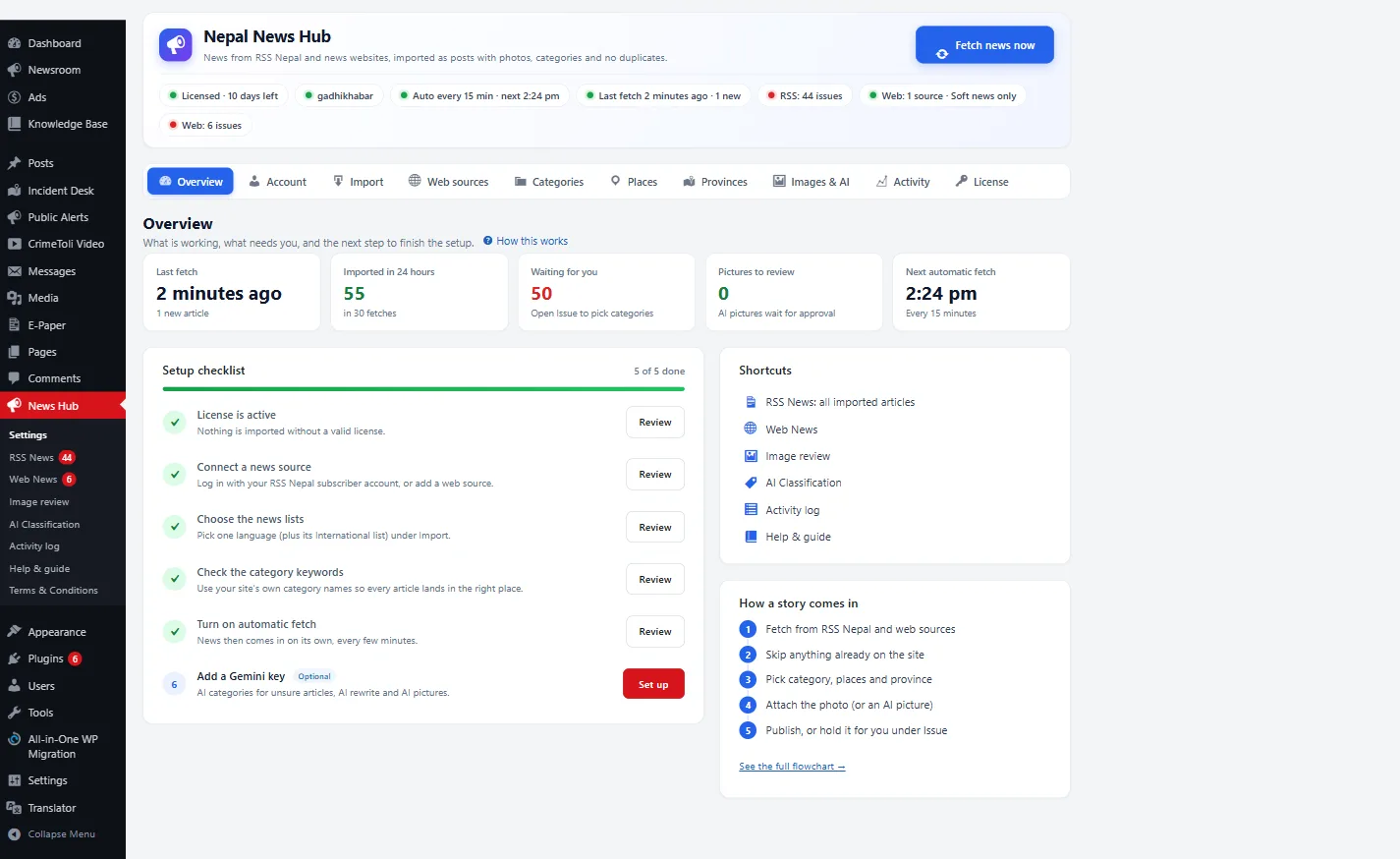
Newsroom Dashboard

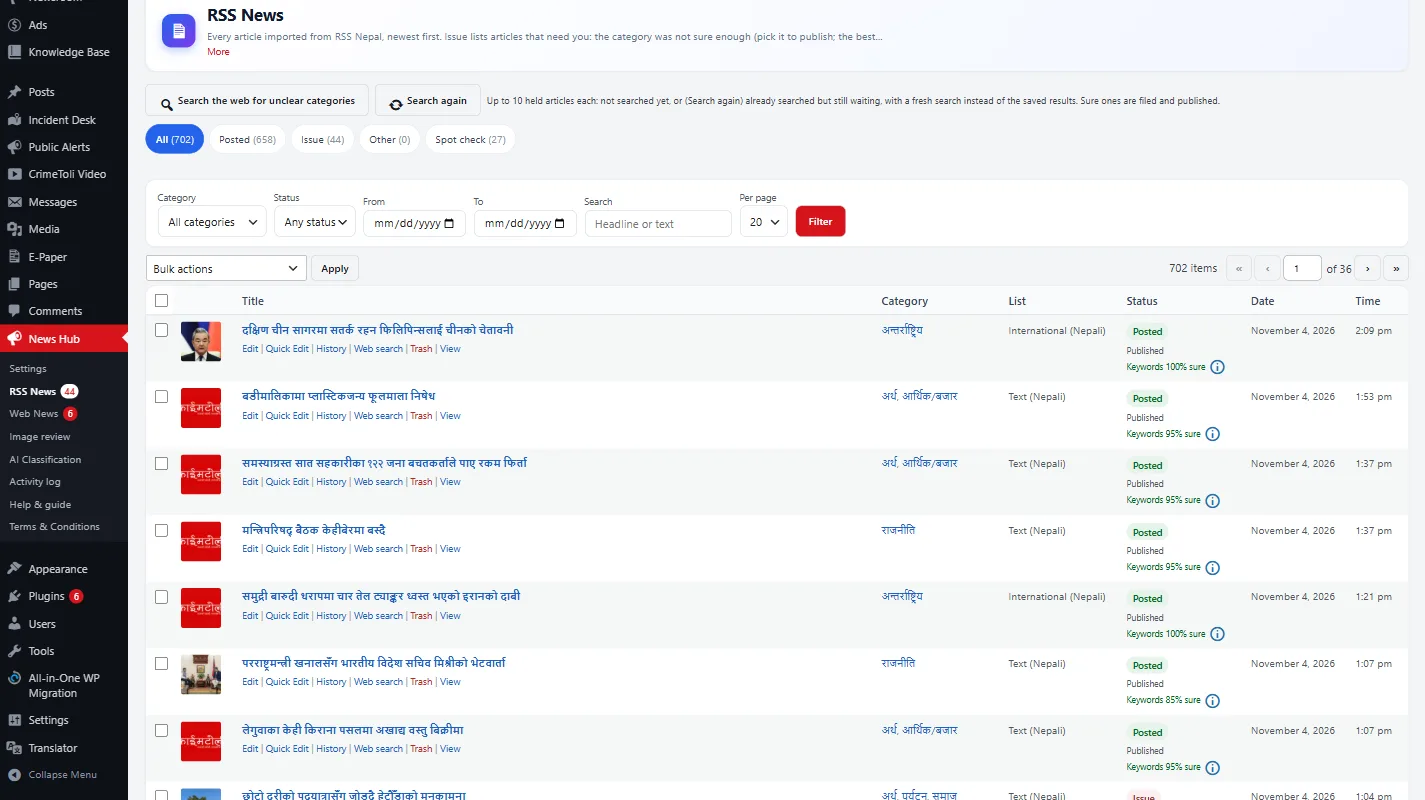
A WordPress-native workspace for imported stories, AI review, activity history and built-in help.

RSS News and Web News

  • Posted
  • Issue / Needs Attention
  • Other

Management

  • Filter by category and date
  • Search by text
  • Edit and Quick edit
  • Publish
  • Move to Trash

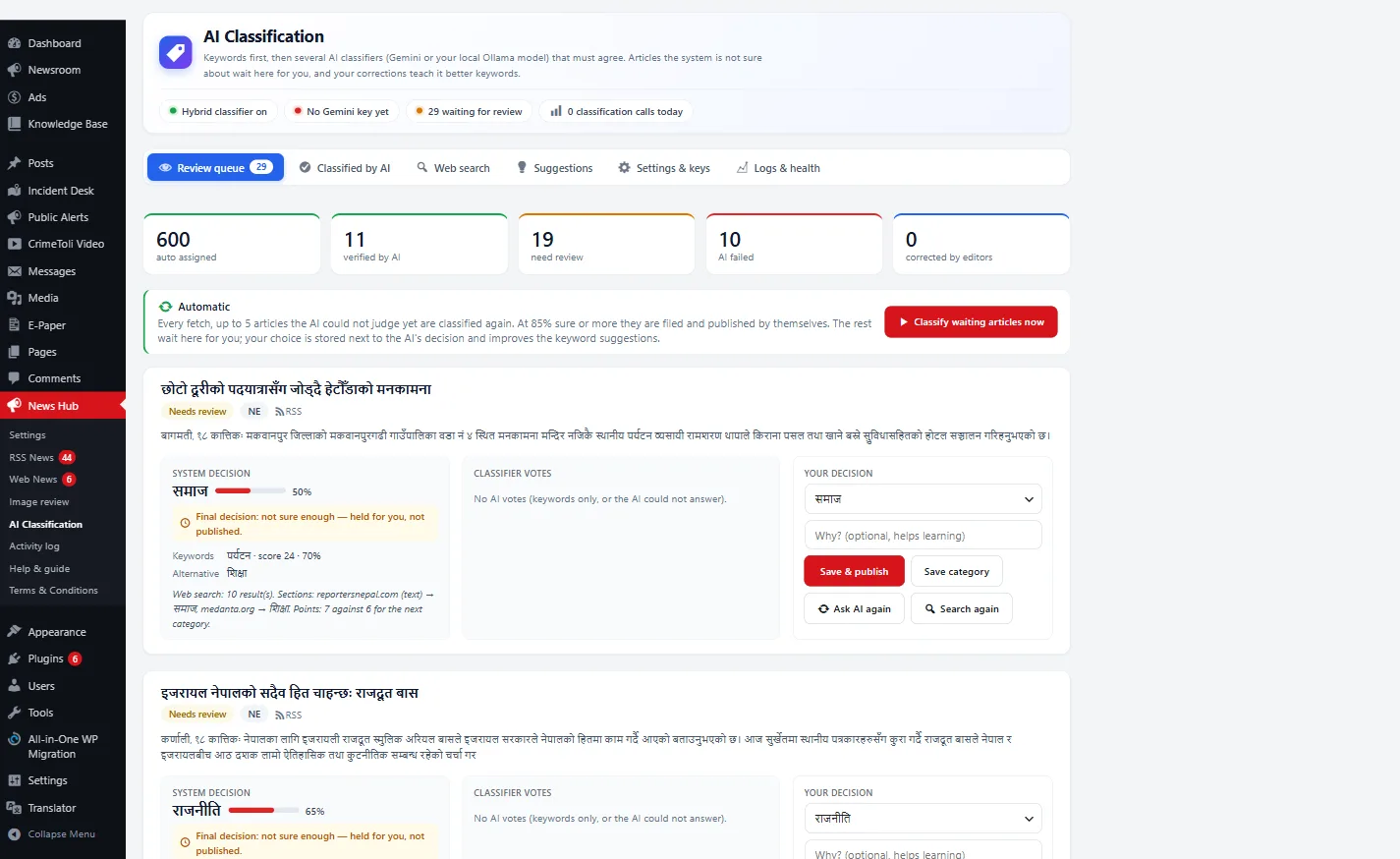
AI Classification screen

  • Review queue
  • Taxonomy suggestions
  • Classification settings
  • AI request log

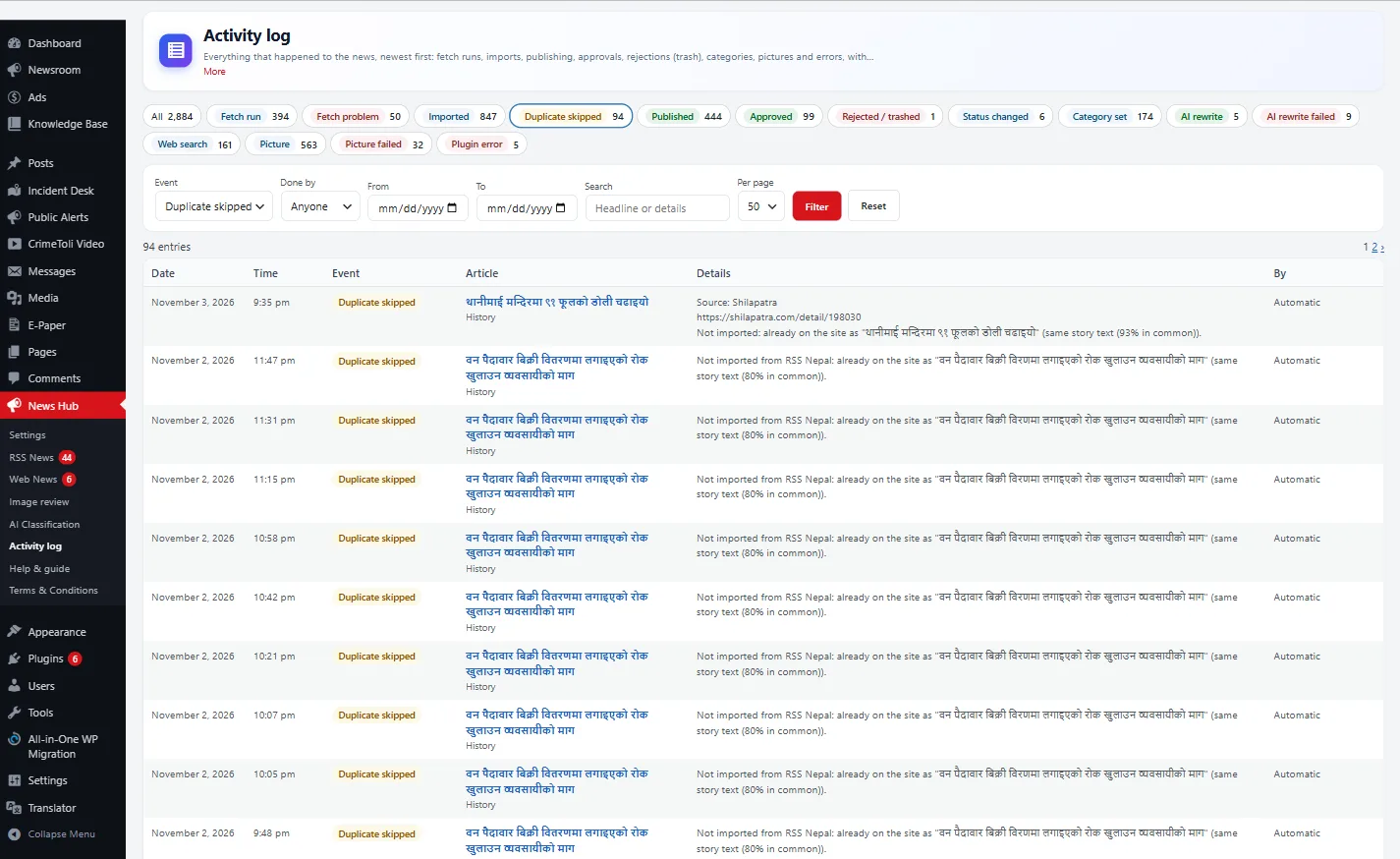
Activity log

  • Fetches, imports and publications
  • Approvals and rejections
  • Errors
  • Timestamps and the user responsible for each action

Built-in help

  • Searchable help guide
  • Flowcharts and screenshots
  • Troubleshooting instructions
10

Source Credit and Branding

Automatic source credit, per-source logos and consistent tagging on every imported story.

  • Automatic source credit, for example: स्रोत: {publisher}
  • Configurable source logo for each source
  • Shortcode [rssn_source_logo], template tags and post metadata support
  • Changing a source logo updates past stories from that source
  • Optional bold dateline, such as विराटनगर, ९ कात्तिक
  • Fixed tags and categories for every import
  • A never-add list for tags and categories
11

Made for Nepal

Nepal time, Nepali keyword matching and ready-made province and location lists.

  • Uses the Asia/Kathmandu time zone
  • Switches WordPress to Nepal time only when the current setting is the default UTC — never overwrites a time zone the site owner chose
  • Correct Nepali keyword matching, including grammatical endings such as प्रहरी and प्रहरीले
  • Preconfigured Nepali category keywords
  • Province and location lists ready to use
12

Security and Reliability

Encrypted secrets, login lockout, private-address blocking and graceful error handling.

Implemented controls

  • Passwords and API keys encrypted with AES-256-GCM
  • Secrets are never written to logs
  • Login lockout after repeated failed attempts
  • Fetches only public web addresses and blocks requests to private and internal addresses

Reliability

  • Errors become readable notices instead of crashes or stuck jobs
  • Multiple Gemini API keys
  • Automatic cooldown when a key reaches its rate limit

No software is perfectly secure. These are the specific controls the Plugin implements; keep WordPress, PHP and your hosting up to date.

13

Licensing and Updates

One-click updates for licensed sites, a grace period during short license-server outages, and accuracy measurement.

  • One-click updates through the WordPress dashboard for licensed sites
  • Grace period during short license-server outages
  • WP-CLI command: wp rssn eval
  • Measure category accuracy against editor decisions

Screens

Inside the Plugin

Illustrative previews with sample data. Real screenshots can be uploaded from the admin media library.

Newsroom dashboard
Classification workflow and review queue
Duplicate detection example
Province tagging example
Image Review
Import configuration

Technical requirements

Runs on the WordPress site you already have

The Plugin installs like any WordPress plugin. Licensed sites receive one-click updates from the WordPress dashboard.

  • WordPress 5.9 or later
  • PHP 7.4 or later
  • A reliable scheduler — a real server cron job is recommended
  • API keys for the AI providers you choose (optional; Pollinations images need no key)

Publishers are responsible for holding the rights, subscriptions or permissions for all source content.

Ready to put your newsroom on autopilot?

See current prices and buy a Plugin licence online on our licence site. Prefer to talk first? Request a demo and we will walk you through it.

FAQ

Plugin questions

Request a demo · Kathmandu Engineering & Support

Request a Demo of the WordPress News Automation Plugin

Tell us about your site and sources. We will set up a walkthrough using workflows like yours.

Private Live Walkthrough

Dedicated staging environment configured with your news sources and custom categories.

Built Specifically for Nepal

Hybrid AI classification, 7 provinces, 77 districts, duplicate detection, and Bikram Sambat (BS) calendar.

Zero Editorial Disruption

Drop into existing WordPress sites in minutes or launch a turnkey news portal with 99.9% uptime.

📰 50+ Media Houses⚡ 10M+ News Stories🇳🇵 All 7 Provinces
Your information is confidential and used solely to respond to your inquiry.